
You ask your web designer to update your hours and swap one photo. A week later, an invoice arrives for an hour or two of work you never agreed to. Or you ask for a new page and find out it's a new project with a new price—after the work is done.
Surprise invoices are one of the quickest ways to sour a relationship with a web designer. They usually aren't fraud. They come from a gap between what the owner thinks is included and what the designer thinks is billable. DesignRush's web development pricing guide puts it bluntly: vague phrases like "as needed" are how projects pile up charges after signing. The same guide notes that over two years, a website's running costs can match or exceed what you paid to build it.
The fix is getting those answers in writing before you need them.

Why "small" changes cost more than you expect
From your side, changing your hours is ten seconds of typing. From a designer's side, it may mean logging in, finding the right file or page, making the change, checking it on a phone and a computer, clearing caches, and confirming it's live. Many designers bill in 15-minute or 1-hour minimums to cover that overhead.
That's not unreasonable on its own. The problem is when nobody told you about it in advance.
The questions to ask before you sign
Ask any designer these questions, and get the answers in your agreement or in writing:
- What's included after launch? Hosting? Domain renewal? Security certificate (HTTPS)? Backups? Any updates at all?
- How are changes priced? Hourly, per change, a monthly allowance, or a care plan?
- Will you tell me the cost before you start? This is the most important question on the list.
- What counts as a change versus new work? Updating a price is a change. A new page usually isn't. Where is the line?
- What happens if the mistake is yours? You shouldn't pay to fix a typo the designer introduced or a broken link they created.
- What does it cost to leave? If you move to someone else, is there a fee for handing over files, logins, or the domain?
If the answers are vague, ask again. "Don't worry, it's usually not much" is not a price.
Habits that keep your costs down
- Batch your changes. Five edits sent together almost always cost less than five separate requests over five weeks.
- Send exact wording. "Change our Saturday hours to 8 a.m. to noon" is faster (and cheaper) than "Can you update the hours?"
- Send finished photos. If you supply photos, send the final, full-size versions you actually want to use.
- Ask for a quote on anything new. New pages, forms, booking tools, and design changes should come with a price before work starts.
How we handle changes at Dells Websites
We designed our monthly plan so you always know what a change costs before it happens.
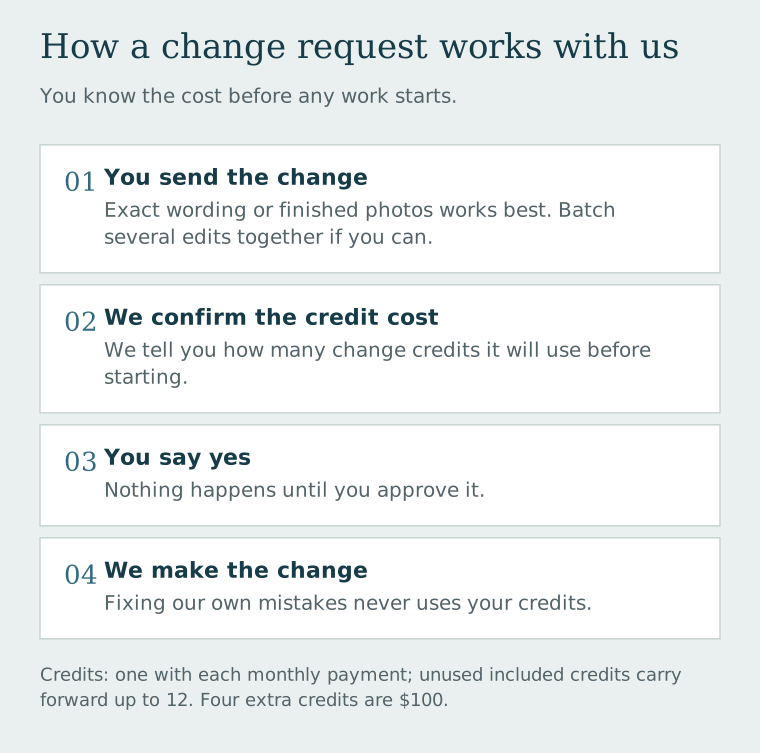
The details:
- Each monthly payment adds one change credit. Unused included credits carry forward, up to a balance of 12. Save them up for a bigger refresh, or use one every month.
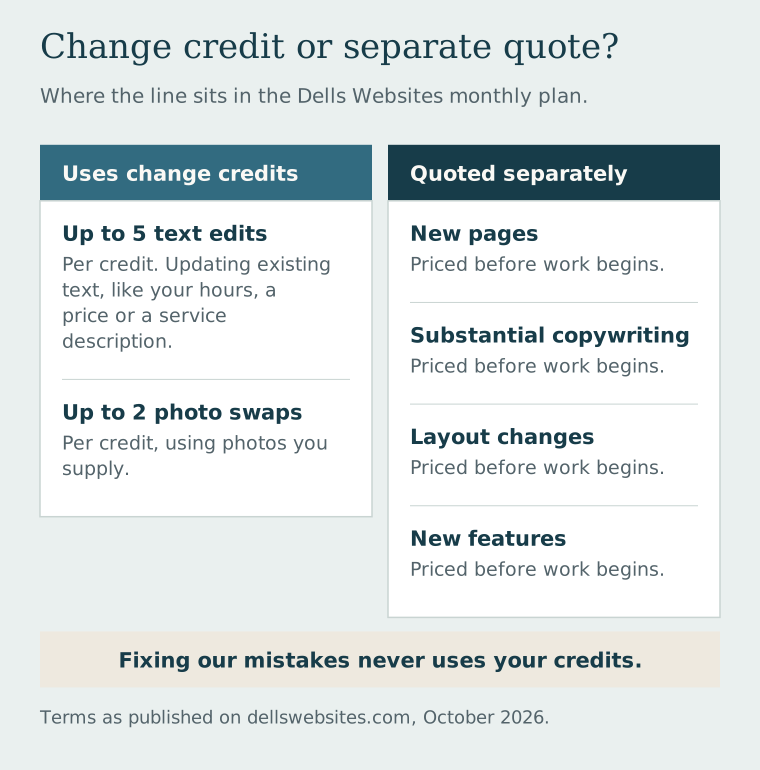
- One credit covers either up to five text edits to existing content, or up to two photo replacements using images you supply. A text edit updates one existing passage, such as your hours, a price, or a service description.
- We confirm the credit cost before starting. No surprise invoice in your inbox a week later.
- Need more? Four extra credits are $100. Purchased credits are tracked separately and don't count toward the 12-credit cap.
- New pages, substantial copywriting, layout changes, and new features are quoted separately, so you can decide before any work begins.
- Fixing our mistakes never uses your credits.
- Hosting, HTTPS, a saved site backup, and standard domain registration and renewal are part of the plan, with the domain allowance agreed before signup.
Current prices and full terms are on our pricing section.
If you're stuck with a website you're afraid to touch because every edit turns into a bill, let's talk about it.
Related reading: The Real Price Tag of a Business Website