
It usually starts with a customer saying, "Hey, I tried to visit your website and it sent me somewhere weird." Or Google shows a warning next to your business name. Or your site just stops loading.
Website hacks feel personal, but they almost never are. Most small-business sites are hit by automated attacks that scan thousands of websites at once, looking for one known weakness. If your site has it, you're on the list.
Why small-business websites get hacked
The most common weak spot is out-of-date software, especially add-ons. WordPress powers a huge share of small-business websites, and most WordPress sites rely on plugins and themes made by many different developers.
Patchstack, a company that tracks WordPress security issues, publishes an annual State of WordPress Security report. Its 2025 numbers are sobering:
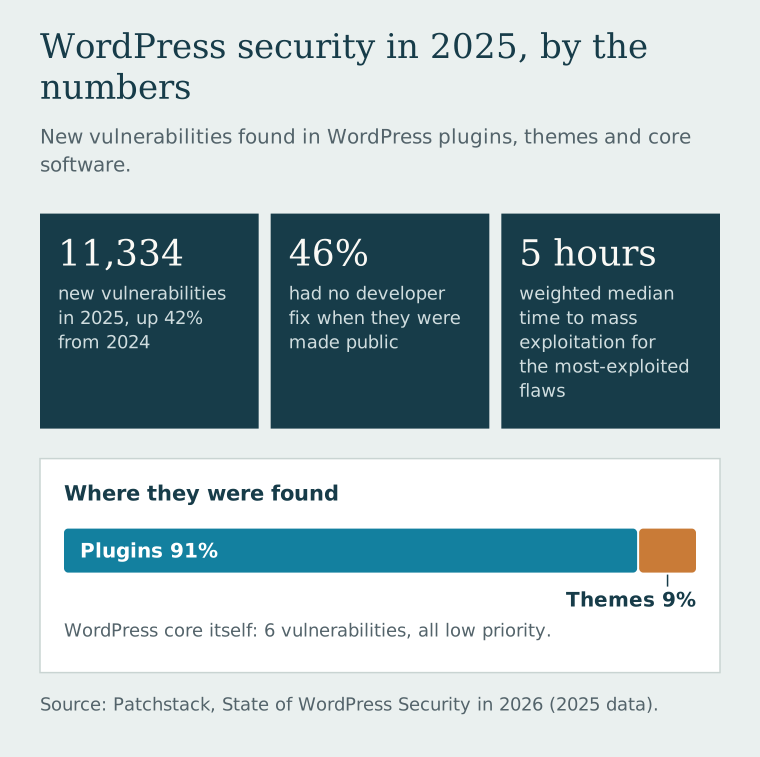
The five-hour figure matters most. "I'll update it next month" no longer works. Neither does a website nobody is watching.
This isn't just a WordPress problem, either. Any website with software that needs updates—and nobody assigned to do them—has the same risk.
If your site has been hacked: what to do first
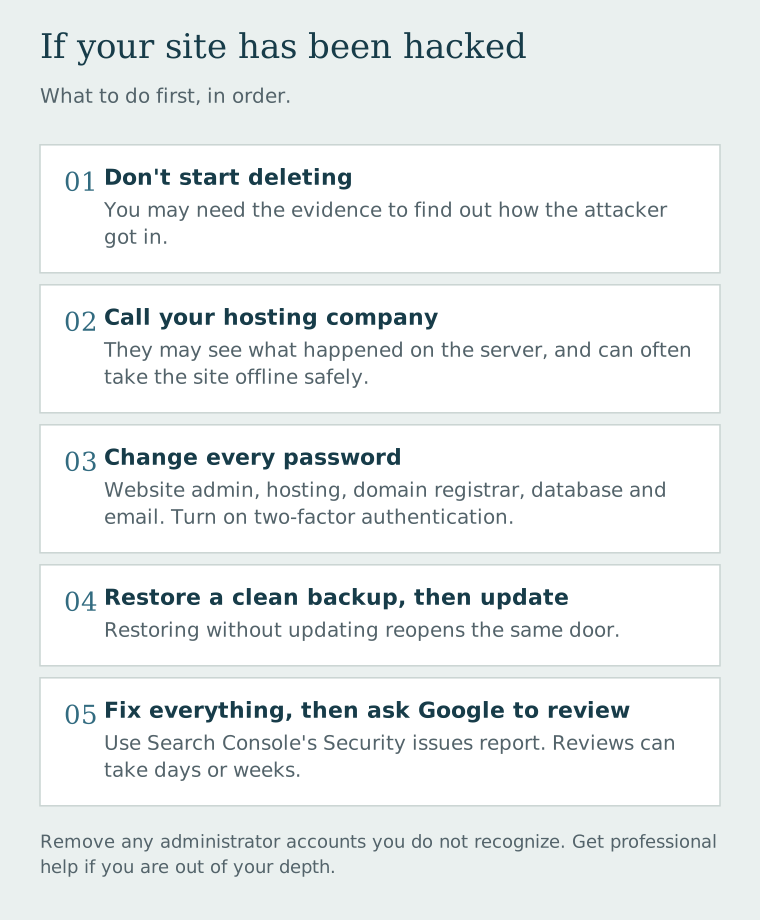
- Don't panic, and don't start deleting things. You may need the evidence to figure out how the attacker got in.
- Call your hosting company. Many hosts have a security team or can tell you what they're seeing on the server. Some will put the site in maintenance mode while you clean it up.
- Change every password connected to the site. That includes the website admin, hosting account, domain registrar, database, and any email accounts tied to them. Turn on two-factor authentication wherever it's offered.
- Remove anyone you don't recognize. Check for administrator accounts you didn't create.
- Restore from a clean backup, if you have one. Choose a backup from before the problem started, then immediately update everything before putting the site back online. Restoring an old backup without updating it just reopens the same door.
- Check Google Search Console. Google's Security issues report shows whether Google has flagged your site as hacked or harmful. Google says you need to fix the problem across the whole site, not just some pages, before you request a review, and reviews can take days or weeks.
- Get help if you're out of your depth. A professional cleanup is far cheaper than a site that gets reinfected two weeks later.
How to keep it from happening again
If your site runs on WordPress or a similar system, this is the maintenance that actually matters:
- Update promptly. Core software, plugins, and themes. Turn on automatic updates where it's safe, and have someone check the site after updates run.
- Delete what you don't use. Deactivated plugins and old themes can still be a risk. If you're not using it, remove it.
- Check plugins before installing them. When was it last updated? Is it still supported? Do you actually need it, or would a simple link or embed do the same job?
- Use individual logins. Everyone gets their own account with only the access they need. No shared "admin" password passed around the office.
- Turn on two-factor authentication for the website admin, hosting, and domain registrar.
- Keep backups somewhere other than your website server, and test them. A backup you've never restored is a hope, not a plan.
- Decide who is responsible. Many hacked sites had no owner. The designer thought the business owner was handling updates; the owner thought the designer was. Put it in writing.
How we approach security at Dells Websites
The safest feature is the one you don't need to install. For most service businesses—a plumber, an electrician, a painter—the website needs to explain the services clearly, load quickly on a phone, and make it easy to call or send a message. That job doesn't require a stack of plugins, so we don't add complexity a site doesn't need. We wrote more about that thinking in When a simple website is the better engineering decision.
Our monthly website plan also includes managed hosting, HTTPS, and a saved site backup, so keeping the technical side healthy isn't left to chance or to your spare time.
If your current site has been hacked, flagged by Google, or you just aren't sure anyone is keeping it updated, tell us what's going on. Even if you're not ready for a new website, we can help you understand what you're dealing with.