
If your web designer stopped answering tomorrow, could you still change your hours, renew your domain, or move your site? Many business owners find out the answer at the worst possible moment.

The story usually goes like this: someone set up the website years ago. It works, mostly. Then the designer retires, gets busy, closes their business, or simply stops replying. When the owner finally needs to make a change, they discover the domain, the hosting, and the logins were all created under someone else's account. A UK chamber of commerce published a whole guide on what to do when your web developer disappears because it happens often enough to need one.
The good news: most of this is checkable in a few minutes, and most of it is fixable.
The keys to your website
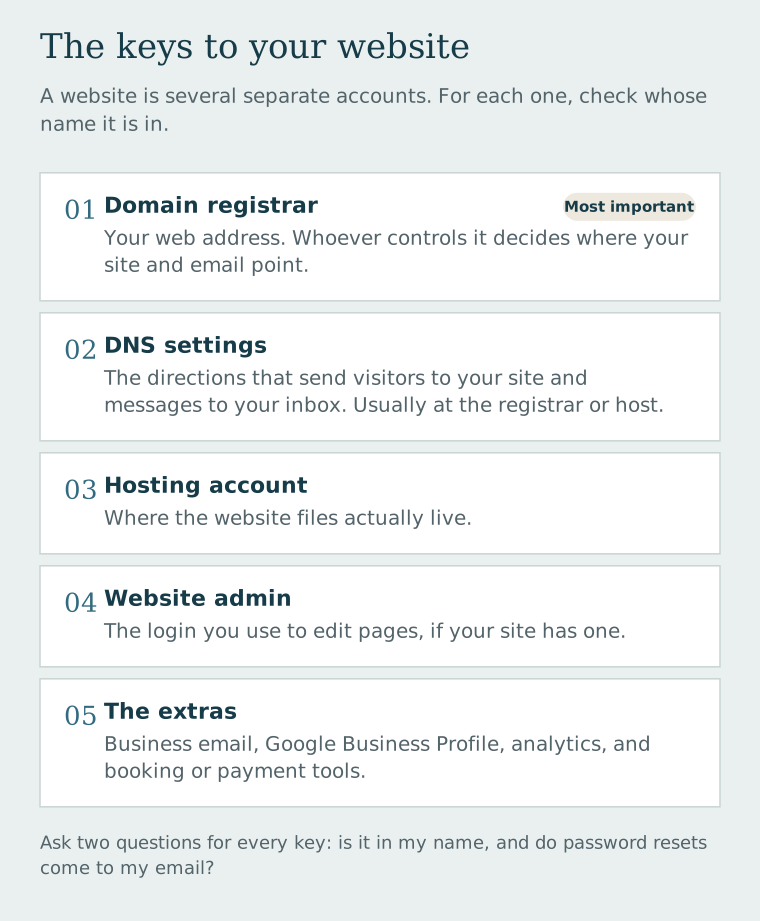
A website is really a handful of separate accounts. You want to know who controls each one.
- The domain registrar — the company where your web address (yourbusiness.com) is registered. This is the most important key. Whoever controls it controls where your address points, including your email.
- The DNS settings — the "directions" that send visitors to your site and your email to your inbox. These usually live at the registrar or with your host.
- The hosting account — where the website files actually live.
- The website admin — the login you use to edit pages, if your site has one (WordPress, Wix, Squarespace, Shopify, and so on).
- The extras — business email, your Google Business Profile, analytics, and any booking or payment tools connected to the site.
The 10-minute ownership check
- Look up your domain. Go to ICANN Lookup and enter your web address. It will show which registrar holds the domain and when it expires. Many registrations hide the owner's name for privacy, so this tells you where to look, not necessarily whose name is on it.
- Log in to that registrar yourself. If you can't, that's your first finding. If you can, check that the registrant contact (the legal owner) is you or your business, and that the account email is one you control.
- Check the expiration date and auto-renew. An expired domain can be lost. Make sure renewal is turned on and tied to a payment method that's still valid.
- Log in to your hosting and website admin. Use an account in your name, not a shared login someone else can change.
- Check the recovery email on every account. If password resets go to your former designer's email address, you don't fully control the account, even if you know the password today.
Write down what you found. If every key is in your name, congratulations—store those logins in a password manager and move on.
If you don't have access
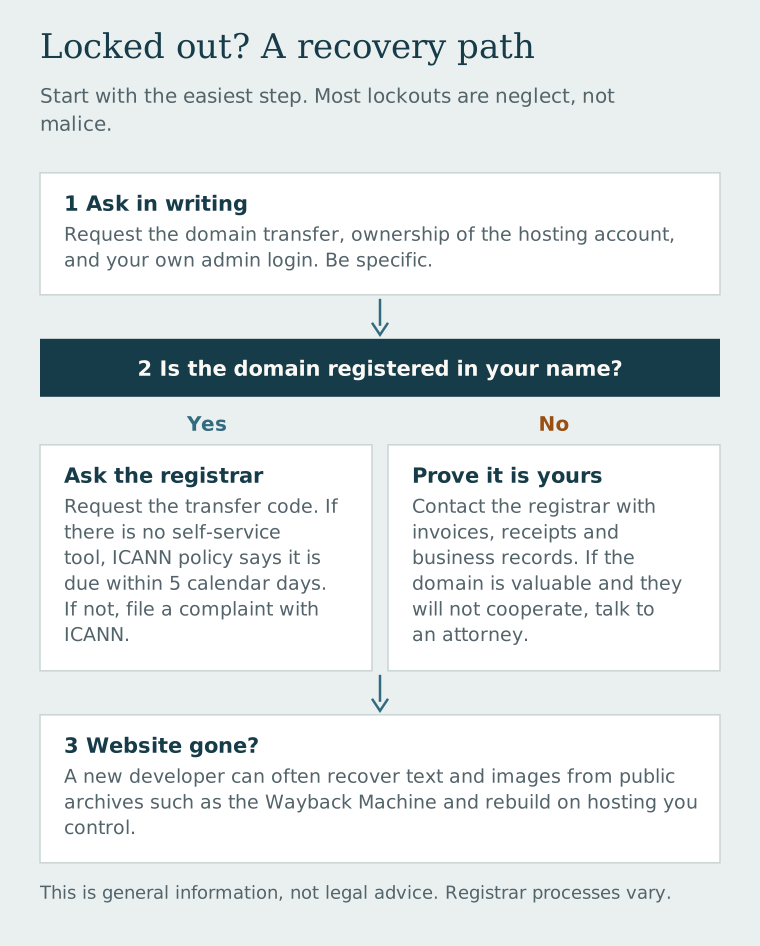
Start with a polite, specific written request. Ask your designer to transfer the domain into your registrar account (or give you the transfer code), add you as the owner of the hosting account, and give you an administrator login to the website. Be exact about what you're asking for. Many lockouts are neglect, not malice.
Know the domain transfer rule. Under ICANN's Transfer Policy, if a registrar doesn't let the domain owner generate the transfer code (sometimes called an "AuthInfo" or "EPP" code) themselves, it must provide that code within five calendar days of the owner's request. ICANN's registrant FAQ explains how to file a complaint if a registrar won't cooperate. Note the important word: owner. These rules protect the registered owner—which is why it matters whose name is on the domain.
If the domain is registered in someone else's name, contact the registrar directly with proof the domain belongs to your business: invoices, receipts, business registration, and anything showing you paid for it. Outcomes vary by registrar. If the domain carries real value for your business and the other party won't cooperate, talk with a business attorney.
If the website itself is gone, don't assume your content is lost. A new developer can often recover text and images from public archives such as the Wayback Machine and rebuild the site on hosting you control.
How we handle ownership at Dells Websites
We'd rather you never have to read the section above. So ownership is spelled out on our pricing page in plain language, before you sign anything:
- Pay Upfront: you own the finished website and any domain we purchase on your behalf after you pay the $199 development fee and first monthly payment.
- Spread the Cost: ownership transfers after you fulfill the initial 12-month agreement and make the final payment.
- Either way: the business content you supply—your text, photos, and testimonials—remains yours.
Before you sign, ask us where your domain will be registered and how you would take your website with you if you ever decided to leave. You should get a clear answer to those questions from us, or from anyone you hire.
Questions to ask any web designer before you sign
- Whose name and account will the domain be registered under?
- When do I own the website, and what exactly do I own—the design, the files, the content?
- If I leave, what do you hand over, and is there a fee?
- Will I have my own login to the registrar, hosting, and website admin?
- Who receives the renewal notices?
A good designer won't be offended by these questions. They'll be glad you asked.
If you're not sure who holds the keys to your current site, tell us what you know. We can help you sort out what you have, even if you aren't ready for a new website.