
A letter arrives from a law firm you've never heard of. It says your website isn't accessible to people with disabilities, cites the Americans with Disabilities Act, and asks you to settle. For many small-business owners, that letter is the first time they've heard that a website could be "inaccessible" at all.
This article isn't legal advice, and if you've received a demand letter or lawsuit, please talk with an attorney and don't ignore the deadlines in it. But understanding the problem, and fixing the most common issues, is something every business can start on today.

How common are these lawsuits?
More common every year. Law firm Seyfarth Shaw tracks ADA Title III filings and reported that:
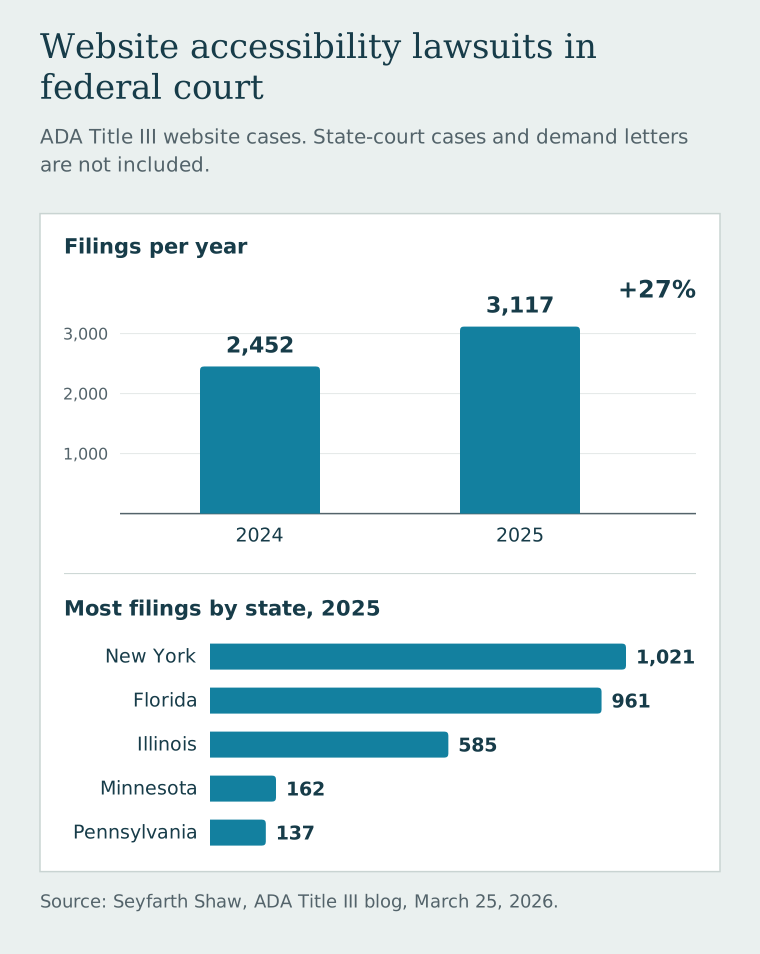
Those numbers don't include cases filed in state courts or demand letters that settle before anyone files a lawsuit, so the real total is higher.
Is my website actually a problem?
Probably, at least a little—and you'd be in large company. WebAIM, a nonprofit accessibility organization, tests the home pages of the top one million websites every year. Its 2026 WebAIM Million report found detectable accessibility failures on 95.9% of them, averaging 56 errors per page. The most common problems were:
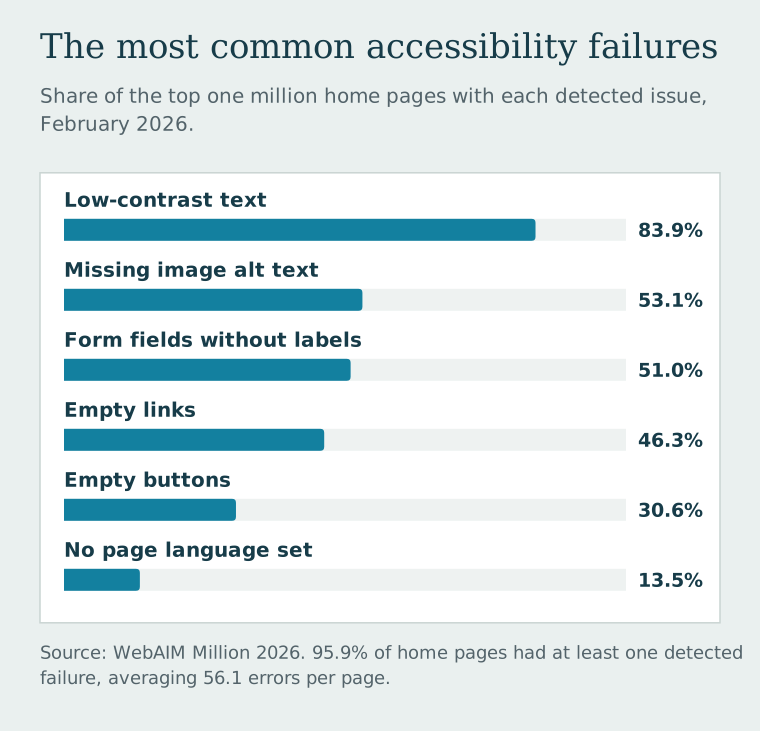
Notice something about those problems: these aren't exotic problems. They're basic, fixable issues that affect real people—someone who uses a screen reader, someone with low vision, someone who can't use a mouse, or an older customer squinting at light gray text on their phone.
Be careful with "one line of code" fixes
You may see ads for accessibility widgets or overlays that promise to make your site compliant automatically. Be skeptical. In 2025, the Federal Trade Commission finalized an order requiring accessiBe to pay $1 million over claims that its AI-powered tool could make any website compliant with accessibility guidelines. The order bars the company from making those claims without evidence to back them up.
A widget can't rewrite unclear link text, add meaningful descriptions to your photos, or fix a form that can't be used with a keyboard. Those fixes belong in the website itself.
What to fix first
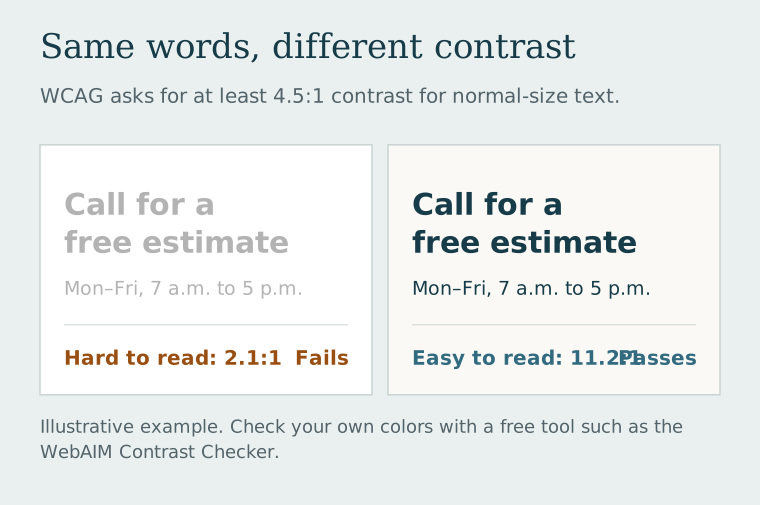
You don't have to understand every accessibility guideline to make real progress. Start with contrast, the most common problem of all:
Then work through the rest of this list:
- Check your color contrast. Light gray text on white, or white text on a pale photo, is the number one problem. Use dark text on light backgrounds (or the reverse) with plenty of difference between them. WebAIM's free contrast checker tells you whether a color pair passes.
- Describe your images. Every meaningful image needs alternative text, a short description screen readers read aloud. "Finished basement with recessed lighting" helps. "IMG_4482.jpg" doesn't. Purely decorative images should be marked so screen readers skip them.
- Label every form field. Each box in your contact form needs a visible label—not just gray placeholder text that disappears when someone starts typing. Error messages should say what went wrong and how to fix it.
- Try your site with only a keyboard. Press Tab to move through it. Can you reach every link, button, and form field? Can you see where you are on the page? If you get stuck, so will some of your customers.
- Write links that make sense on their own. "Get a free estimate" beats "Click here." Icon-only buttons, like a phone icon, need a text label behind the scenes.
- Use real headings in order. Headings should be actual headings, not just big bold text, so people using assistive technology can jump around the page.
- Don't put important text inside images. Your hours or phone number in a graphic can't be read by a screen reader—and can't be tapped to call.
- Caption your videos. If a video explains something important, add captions.
A free tool like WAVE from WebAIM can scan a page and point out many of these issues. Automated tools catch some problems, not all of them, so pair the scan with the keyboard test above.
How we approach accessibility at Dells Websites
We'd much rather build accessibility in than bolt it on later. The things on the list above—readable contrast, real headings, labeled forms, descriptive images, links that make sense, and pages that work on a small phone screen—are part of building a good website, not an extra charge. A site that's easier for someone using a screen reader is also easier for everyone else to use.
We can't promise any website is lawsuit-proof, and we'd be wary of anyone who does. What we can do is build carefully, test the basics, and explain what we checked.
If you're worried about your current site, send us the address and tell us what's going on. And if you've already received a demand letter, call your attorney first; then we can help with the website fixes.
Related reading: Why a website feels polished: the decisions behind the design