
If you run a business in Wisconsin, you may have seen the news about a blind woman from Racine who has sued a long list of businesses because their websites did not work with her screen reader. Some owners think the suits are unfair, and others point out that a website a blind person cannot use is a real problem. Either way, the question every owner is asking is whether this could happen to them and what they should do about it, so this article looks at what is actually known.
This article is not legal advice. If you have already received a demand letter or a lawsuit, please call an attorney before you do anything else and pay attention to the deadlines in it. Everything below comes from the sources linked in the text and listed at the end.

What the news stories say
The woman is Melissa McCabe, who is blind and lives in Racine. In February 2025 the Milwaukee Journal Sentinel reported that a federal court search turned up 30 or more suits she had filed over the previous two years. Her attorneys say the sites were not compatible with screen readers when she tried to buy things like coffee, shoes, a violin, headphones, and car tires. Two of the businesses named were Anodyne Coffee and Koss Corporation. The suit against Anodyne described a pop-up window, opened from the Tickets button on its events page, as not accessible to screen reader users, and the suit against Koss said its product manuals for headphones and speakers were not accessible either. Anodyne put a statement about its accessibility work on its website in October, a month after the suit was filed, and neither company responded to the paper's requests for comment.
In 2024 TMJ4 in Milwaukee reported that McCabe had sued more than twenty retail websites. One of the people sued, a craft business owner, was served with a federal lawsuit and settled for $7,500, and she says the case cost her around $20,000 after attorney fees. Court records said her homepage had several unlabeled or mislabeled elements. She told TMJ4 she would want to fix that kind of problem, and she wants the federal government to set clear standards for online stores and give businesses a grace period before they can be sued. McCabe's attorney declined to comment on active litigation.
People see this very differently. Critics told the Journal Sentinel the suits are largely driven by profit, and Robert Thorpe, an attorney who defends companies against them, said settlements range from $1,000 to $25,000. Denise Jess, the executive director of the Wisconsin Council of the Blind and Visually Impaired, said advocates usually start with education and treat a lawsuit as a last resort. She also told TMJ4 that businesses should be contacted directly first and that these suits can reinforce negative stereotypes about blind people. Meanwhile the Bureau of Internet Accessibility, which sells accessibility services, points out that a plaintiff's motivation is irrelevant in most ADA lawsuits. Nobody reading a headline can know what is in anyone's mind, and an owner does not need to. A blind customer who cannot check out on a website has a real problem, and a small business owner facing a $20,000 bill has a real problem too.
Those stories are from 2024 and 2025, and a search for newer coverage of McCabe's cases turned up nothing, so where they stand today is unclear. These suits are still being filed in Wisconsin, though. In July 2026 a judge in the Eastern District of Wisconsin granted a default judgment to a legally blind plaintiff, Amelia Cazares, who alleged that Organic Cotton Mart LLC failed to keep its website accessible to legally blind users. A default judgment usually means the business did not respond to the lawsuit.
Does the ADA really apply to a website?
The U.S. Department of Justice says it does. Its web accessibility guidance says the ADA applies to the goods, services, privileges, and activities that businesses open to the public offer, including the ones offered on the web. Courts do not all agree on how far that goes. A December 2024 post from Harvard Law professor Joseph Singer lists several courts that have held the ADA covers only physical places. It also notes that the Seventh Circuit, which includes Wisconsin, said in 1999 in Doe v. Mutual of Omaha that a Web site can count. That case was about insurance benefit caps and not a website, so it does not settle the question by itself, but it is not the direction a business owner in Wisconsin wants to bet on.
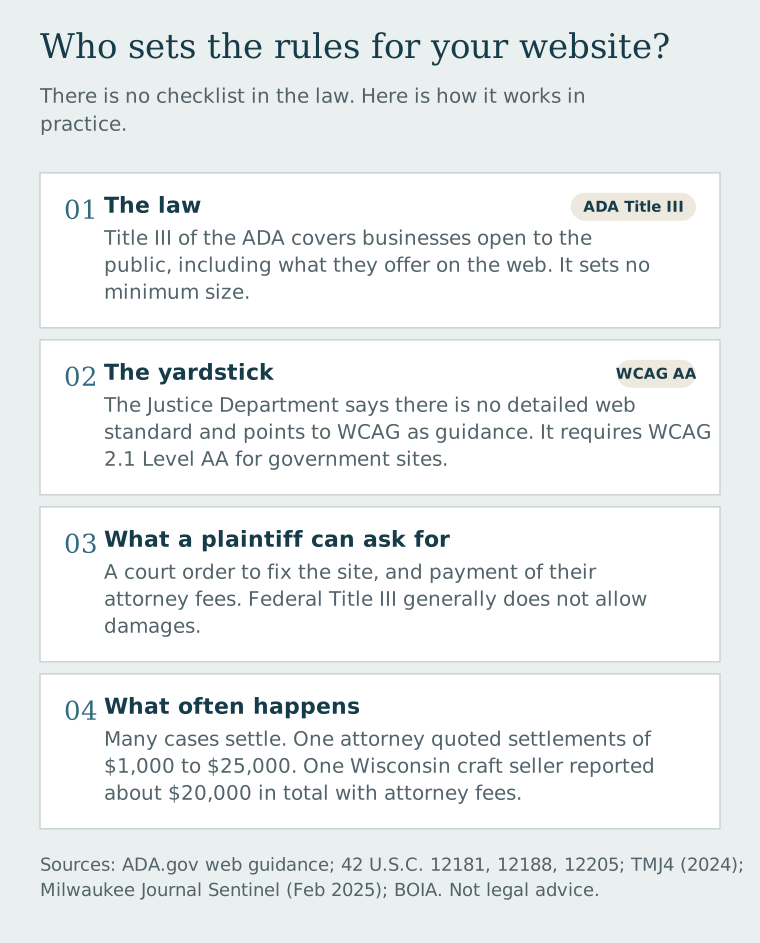
Here is the part that surprises most owners. There is no law that lists exactly what a business website must do. The same DOJ page says there is no detailed web standard and that businesses have flexibility in how they comply, and it points to the Web Content Accessibility Guidelines, usually called WCAG, as helpful guidance. For state and local governments the DOJ went further and wrote a rule that requires WCAG version 2.1 Level AA, so that is the sensible target for a business site too. The newest version is WCAG 2.2.
As for what a person suing a business can actually get, the federal law that covers private businesses lets a court order changes to fix the problem, and the court also has the discretion to award reasonable attorney's fees to the winning side. The law's remedies section does not list money damages for private plaintiffs, and BOIA says the same, though some states such as California allow damages under their own laws. A required fix plus possible attorney fees helps explain why many of these cases end in settlements like the ones above.
Who has to comply?
Private businesses that are open to the public are covered by Title III of the ADA. The law lists twelve kinds of covered businesses, including stores, restaurants, hotels, and service businesses like health care offices and banks, and it does not set a minimum number of employees or a size cutoff, so being small does not by itself exempt you. Whether a particular business counts, for example a plumber who only works at customers' homes, is a question for a lawyer and not something to guess at. The sites in the Wisconsin stories were online sellers, and either way an accessible site serves more customers. The CDC reports that more than 1 in 4 adults in the United States, over 70 million people, reported having a disability in 2022.
State and local governments, which includes Wisconsin cities, counties, and school districts, fall under Title II, and they now have a specific rule to follow. In April 2026 the DOJ pushed the deadlines back one year, to April 26, 2027 for entities serving 50,000 people or more and April 26, 2028 for smaller ones, and the standard is still WCAG 2.1 Level AA.
How do you know if you are at risk?
Nobody can give you exact odds, but the stories above point to some features that make a site a likely target. Here is a rule of thumb, and it is not a legal test. The more of these that sound like your site, the sooner it is worth getting reviewed.
Selling online or taking payments is the first one. McCabe's suits grew out of trying to buy things, and the retailers in the TMJ4 story were online sellers. Booking forms, quote requests, and checkouts belong in the same group, because they are where a person has to finish a task to do business with you.
Pop-ups and add-ons are the second. The Anodyne suit included a claim about a pop-up window, and WCAG has a rule, No Keyboard Trap, that says if someone can tab into a component they must be able to tab back out of it.
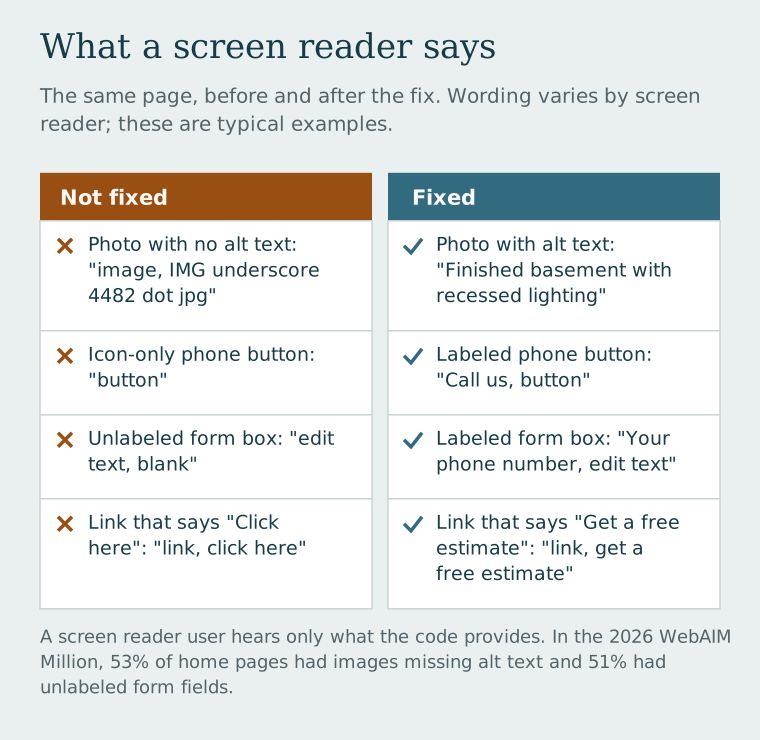
Missing labels and descriptions are the third. The craft seller's court records mentioned unlabeled elements, and the DOJ's guidance lists images without alt text and forms without labels a screen reader can announce as common barriers. In the 2026 WebAIM Million study of one million home pages, 53.1% had images missing alt text, 51% had form fields with no labels, 46.3% had empty links, and 30.6% had empty buttons.
Documents are the fourth. The Koss suit named product manuals, so check any PDF manual, menu, or price list on your site, and be careful with photos of text, since WCAG asks that text be real text instead of an image of text wherever it can be.
The last one is never having tested the site at all. The same WebAIM study found detectable accessibility failures on 95.9% of home pages, with an average of 56 errors per page, so odds are decent that yours has some too.
What to fix first
You do not have to learn all of WCAG to make real progress. These fixes come straight from the DOJ's list of common problems and the WCAG rules behind them.
Describe your images. Every photo that carries information needs alt text, which is a short description a screen reader reads out loud, and the standard calls it non-text content. A description like "finished basement with recessed lighting" helps, and a file name like IMG_4482 does not.
Label every form field. Each box needs a visible label and not just gray placeholder text that disappears when someone types, which is covered by labels or instructions. Error messages should also say what went wrong and how to fix it.
Make everything work with a keyboard. Someone who cannot use a mouse needs to reach every link, menu, button, and form with the Tab key and be able to see where they are on the page, which is the keyboard requirement in WCAG. Pop-ups need to open and close that way too.
Check your text contrast. WCAG asks for a contrast ratio of at least 4.5 to 1 for normal text, and pale gray on white usually fails.
Write links that make sense on their own. "Get a free estimate" tells a screen reader user where the link goes and "click here" does not, and WCAG covers this under link purpose. Icon-only buttons need a text label behind the scenes as well.
Do not rely on color alone, and caption your videos. The DOJ gives red text for required fields as an example of color-only information that a screen reader will not convey, and it lists missing captions as a barrier for people who are deaf or hard of hearing.
How to test your own site in about fifteen minutes

Start with the keyboard test. Put your mouse aside and press Tab through your home page and your contact or checkout page, and if you get stuck or lose track of where you are, so will some of your customers. Then zoom the page to 200% and look at it on your phone, because WCAG wants text to be resizable up to 200% without losing content.
Next run a free scanner like WAVE from WebAIM, and then try a screen reader. On a Mac you press Command-F5 to turn VoiceOver on, and while it feels awkward at first, if you cannot find your phone number or submit your form, you have found a real problem. The W3C's easy checks are a good guided walk-through, though the W3C is clear that they cover just a few issues and a page can pass them and still have significant barriers, so a full audit is the next step if you are worried, and the free accessibility review described below is a simple way to get a first look.
Get a free accessibility review
With nearly every home page in the WebAIM study showing at least one detectable problem, the quickest way to find out what your own site has is to have it checked. Dells Websites offers a free accessibility review that gives you answers fast. Enter your website address and your initial results appear in under a minute, and within 24 hours you also receive a detailed assessment, with evaluations of how your site measures up on accessibility against the WCAG guidelines, along with mobile and speed, and best practice recommendations for what to improve. The accessibility evaluation covers things like text contrast, image descriptions, keyboard use, form labels, and headings, which are many of the problems listed above.
The review is free and there is no obligation. It is not legal advice or an ADA compliance determination, so for legal questions it is best to talk with an attorney.
Skip the one-line-of-code fix
You may see ads for overlays or widgets that promise to make a site compliant automatically. In April 2025 the FTC finalized an order requiring accessiBe to pay $1 million over claims that its product could make any website compliant with WCAG, which the FTC alleged were false, misleading, or unsubstantiated. A widget cannot write good descriptions for your photos or fix a form that does not work with a keyboard, so those fixes need to happen in the site itself.
Keep a record of what you do
The Journal Sentinel article recommended that businesses test their sites with third-party tools, get an accessibility audit, and set up a way for people to report problems. It also helps to keep dated notes of what you checked and fixed, and put a short accessibility statement on your site with an email address or phone number where someone can reach you. Anodyne published a statement about its accessibility work, and a visitor who can reach a real person has a way to tell you about a problem before it turns into a lawsuit. If someone does write to you, answer quickly.
One more thing to ask your accountant about is the federal Disabled Access Credit. According to the IRS, a small business that earned $1 million or less, or had no more than 30 full-time employees, in the previous year can claim it, and Form 8826 caps the credit at $5,000 a year. Whether website work qualifies is a question for a tax professional.
Accessibility is not a one-time fix. Sites change, new pages get added, and plug-ins get updated, so the same quick checks are worth repeating from time to time. And if a demand letter ever does arrive, call an attorney first and then work through the fixes. Thank you for reading.
Related reading: Website accessibility lawsuits: what to fix first
Sources
Milwaukee Journal Sentinel (Feb. 17, 2025), via Yahoo News: A visually impaired woman is suing Anodyne, Koss over their websites
TMJ4 Milwaukee (2024): Businesses frustrated with frivolous ADA website lawsuits filed by Racine woman
U.S. District Court, E.D. Wis. (July 16, 2026): Cazares v. Organic Cotton Mart LLC
U.S. Department of Justice: Guidance on Web Accessibility and the ADA
Joseph Singer, Harvard Law School (Dec. 22, 2024): More courts hold that the ADA does not apply to websites
U.S. Code: 42 U.S.C. 12181, 42 U.S.C. 12188, 42 U.S.C. 12205
BOIA (Feb. 19, 2025): Are web accessibility lawsuits a money grab?
Campus Technology (Apr. 27, 2026): DOJ extends deadline for ADA Title II compliance
CDC (July 16, 2024): Over 70 million U.S. adults reported having a disability
W3C: WCAG 2.2 and Easy checks for accessibility
WebAIM: The WebAIM Million, 2026 and WAVE
Dells Websites: Free accessibility review
Apple: Turn VoiceOver on or off on Mac
FTC (Apr. 22, 2025): FTC approves final order requiring accessiBe to pay $1 million
IRS: Tax benefits for businesses that accommodate people with disabilities and Form 8826